
Blocky Character Concept: Check a Front-Side-Back Turnaround
Review a blocky character concept across front, side and back views, tracking the hood, bag and strap before requesting motion.
What's new on this page
- 2026-10-29 — Page published. Clarified the guide’s search focus, added a practical FAQ and replaced the embedded video with an image.
When a blocky character turns, its design should remain coherent from every angle. Use the front-side-back worksheet to track its defining features before reviewing a clip.
For a blocky character concept, a convincing front view leaves an important question unanswered: what happens when the character turns? A bag can change sides, a hood can become a hat, and a stripe can disappear around the shoulder. Before using a character idea in a video or a skin editor, prepare a short front-side-back continuity note.
This guide provides an original turnaround review exercise for concept images and visual planning. A usable game texture is a separate deliverable: follow the chosen model's layout and import requirements when preparing it.
Blocky character concept: give the character three anchors
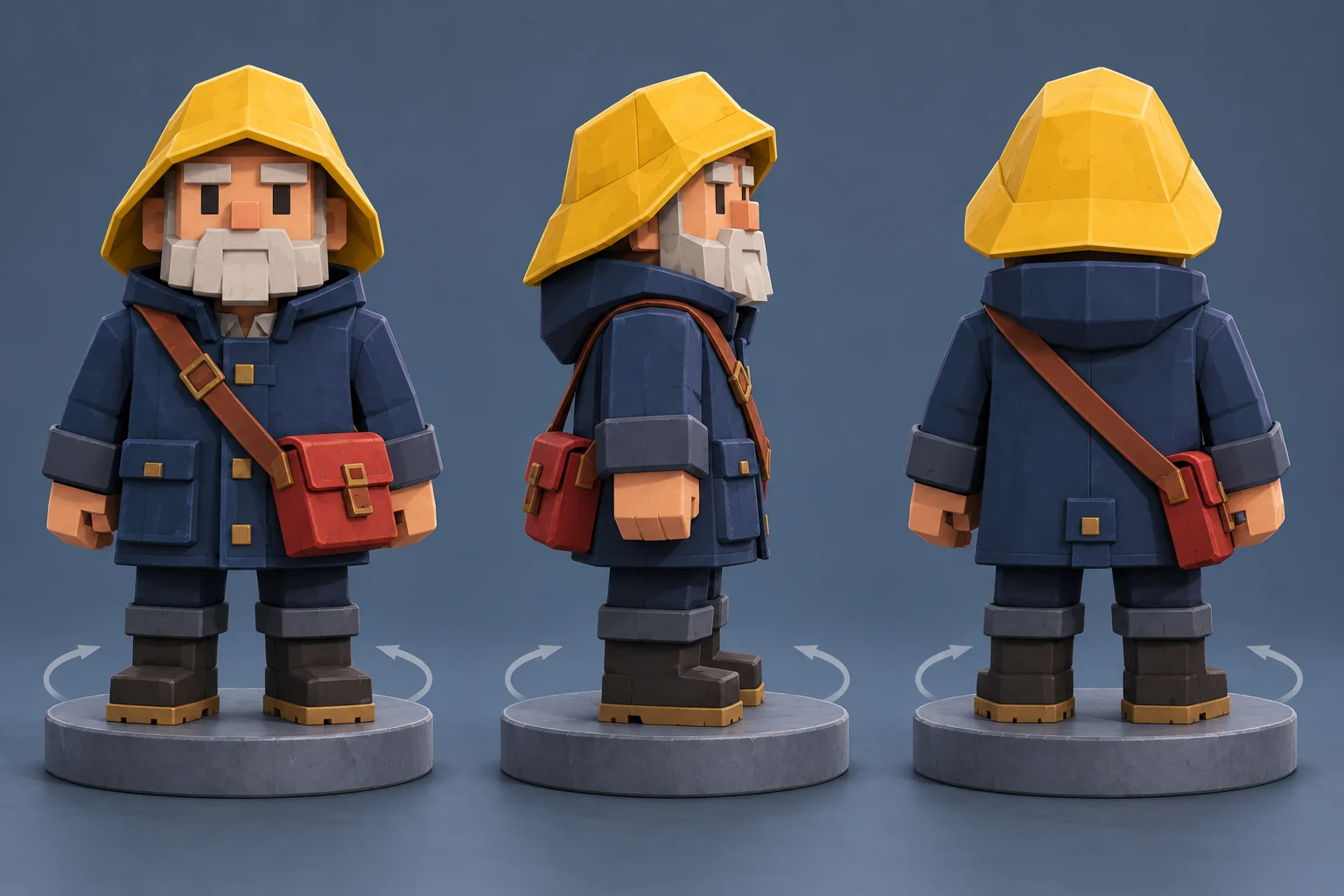
Our fictional lighthouse keeper has a navy coat, a yellow hood and a red shoulder bag. Those large features should remain recognizable as the viewing angle changes. Before describing weather, dramatic lighting or a camera orbit, write down where each feature belongs.
Use the character's own left and right throughout the note. “On the left of the picture” changes meaning when the view turns around. “On the character's left hip” describes a consistent attachment point. This distinction is especially useful for straps, patches and asymmetrical hair.
The concept illustration presents several views for comparison. Its yellow headwear reads more like a brimmed rain hat than the attached hood in our brief: that is a visible mismatch to record, not a requirement it has passed. The red bag and strap also need a deliberate side check across the views. Matching clothing colors alone does not establish continuity.
Make a front-side-back worksheet
Record the written decision and review check for each feature before requesting additional views:
-
Feature: Yellow hood; Written decision: Attached to the coat, surrounding the head; What to inspect: It should not become a separate brimmed hat
-
Feature: Red bag; Written decision: Fixed to the character's chosen hip; What to inspect: Front and back views should agree on the physical side
-
Feature: Shoulder strap; Written decision: Crosses the chest and continues around the torso; What to inspect: It should connect to the same bag rather than terminate randomly
-
Feature: Navy coat; Written decision: Same length and broad shape; What to inspect: A side view should not turn it into a short jacket
-
Feature: Boots; Written decision: Same color and height; What to inspect: Changes of angle should not create a different outfit
You can intentionally redesign a feature, but record the change. A different bag position may be a useful new version; it is not continuity with the old one. Keeping those categories separate prevents an attractive revision from quietly replacing the original brief.
Request a useful still before motion
Use the image workspace to explore a character still with the controls currently available. If you use a reference mode, supply a clear approved concept and inspect the accepted input types. Do not assume that selecting a video-focused site makes every image model support multi-view reconstruction.
An original suggested direction is:
Show a full-body blocky lighthouse keeper concept with a navy coat, attached yellow hood and red bag on the character's left hip. Keep the coat length and boots consistent. Use a simple neutral background and a clear side view that reveals the bag attachment. Omit written labels and interface graphics.
This is a proposed input, not a tested generation result. A single side view also cannot prove that the back is correct. Review each candidate against the worksheet and retain the views that agree with your design decisions.
Keep a turn request modest
If you later explore animation in the video workspace, start with a motion that lets you see the anchors. A slow, restrained turn is easier to inspect than a turn combined with jumping, a moving camera and a changing location. Choose parameters offered by the actual workflow and read its quote before submitting.
Write one sentence for motion and another for what must remain stable. For example: “The character turns slightly toward the side. Keep the hood, coat length and bag attachment unchanged.” If the selected mode accepts a motion reference, make sure that reference does not contradict the written action.
No animation was generated to establish a success rate for this guide. The worksheet is a review method. It helps you describe a mismatch after watching a real result, rather than assuming a prompt has guaranteed consistency.
Inspect transitions as well as endpoints
Watch a candidate at normal speed, then pause near the point where the bag or hood passes out of view. Distinguish an object being hidden from an object changing. A bag behind the torso may be correctly occluded; a bag that reappears on the opposite hip needs a closer check.
Keep a note of the time and the visible issue. “Strap switches shoulder halfway through the turn” is more useful than “character looks wrong.” Change one relevant instruction in the next version and compare the same moment again. Check the current purchase options and active request quote before paying for another attempt.
Preserve the design handoff
For an actual skin, transfer the approved appearance into a proper texture layout and inspect it on the matching model. For a video concept, preserve the reference still and continuity note with the exported clip. These are different uses of the same design work.
The completed worksheet should tell another creator where the bag belongs, what shape the coat has and which details remain unresolved. That is enough to make the next step deliberate, even when a generated view needs correction.
Frequently asked questions
Why check a blocky character concept from several angles?
A frontal image cannot establish unseen details. Decide how key items continue around the character, record those decisions, and inspect both the end views and the transitions.